Policy builder
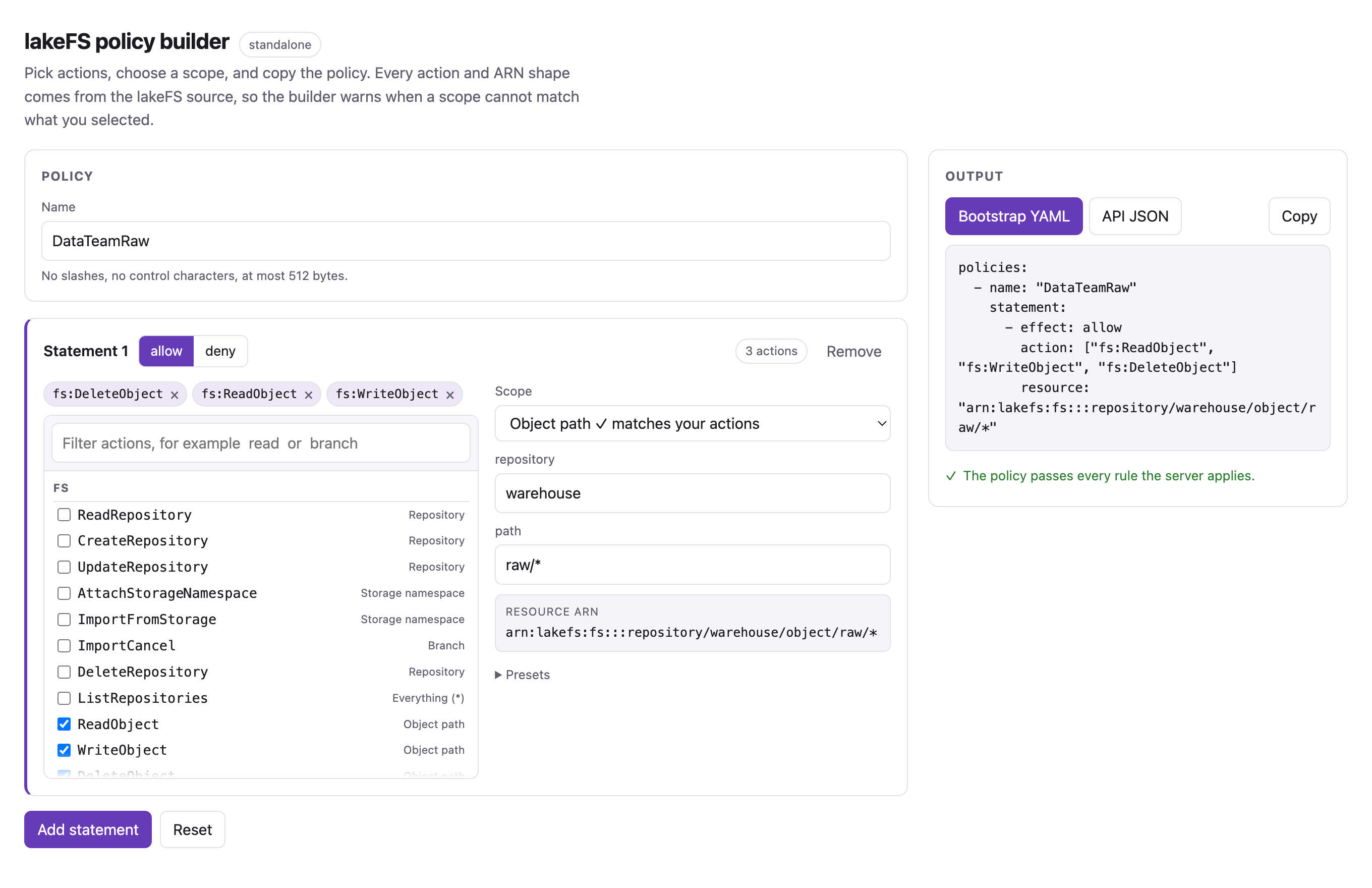
Build a lakeFS policy, then copy it into a bootstrap file or into a POST /auth/policies call.
The builder knows every action lakeFS defines and the ARN that lakeFS checks each action against. It warns when a statement mixes actions that lakeFS resolves to different resources, because such a statement grants less than it looks like.
The builder needs a wide window for its two-column layout, so it opens in its own tab rather than inside this page. It runs entirely in the browser and needs no server, so the link above works from the documentation alone.
Run it against your own data
Opened from the documentation the builder is standalone: it validates what you type, but the repository, branch, user, group, and policy fields stay free text.
lakefs-authz can serve the same page with live names filled in. Give it a
listener address and the lakeFS endpoint:
lakefs-authz \
  --listen 0.0.0.0:8000 \
  --builder-listen 127.0.0.1:8080 \
  --lakefs-endpoint http://lakefs:8000/api/v1
No credential belongs in that command, and the server stores none.
How the builder knows who you are
The builder reuses the lakeFS session you already have. When you sign in to
lakeFS, lakefs-authn sets an internal_auth_session cookie. Cookies ignore
the port, so a browser signed in to lakeFS on example.com:8000 also sends that
cookie to a builder on example.com:8080. The builder forwards the cookie to
lakeFS on every call, and lakeFS applies your own policies.
The result: the builder never shows a repository, branch, user, group, or policy that you could not already see in lakeFS. Sign in as a different person and the lists change.
sequenceDiagram
    participant B as Browser
    participant P as Policy builder (:8080)
    participant L as lakeFS (:8000)
    B->>L: sign in with SSO
    L-->>B: Set-Cookie internal_auth_session
    B->>P: GET /api/repositories (cookie sent, port ignored)
    P->>L: GET /repositories (same cookie)
    L-->>P: only the repositories this user may see
    P-->>B: those names
Different hostnames need a cookie domain
The cookie travels between ports on one hostname, not between hostnames. If
lakeFS is on lakefs.example.com and the builder is on
authz.example.com, set --cookie-domain .example.com on lakefs-authn
so the browser sends the cookie to both.
Without a session the page still loads and still validates, but every data route
answers 401 and the fields stay free text. The badge at the top says which
mode you are in: standalone, sign in to lakeFS for live names, or
live as <your user name>.
What each caller sees
Three callers against one builder in the compose demo:
| Caller | /api/context |
/api/names |
|---|---|---|
| No session | user: null |
401, sign in first |
user, in Developers |
user: "user" |
empty lists |
admin |
user: "admin" |
2 users, 4 groups, 10 policies |
user gets empty lists because lakeFS denies them auth:ListUsers,
auth:ListGroups, and auth:ListPolicies. The builder reports that as an empty
list rather than an error, because the names only feed autocompletion.
Create the policy from the builder
With a live session the output panel gains a Create in lakeFS button. It
sends the policy to lakeFS as you, so lakeFS enforces auth:CreatePolicy. The
button can do nothing you could not already do in the lakeFS user interface.
The button appears only when a session is present, and stays disabled while the policy has an error. Warnings do not block it.
What lakeFS answers is shown verbatim under the button:
| Result | What you see |
|---|---|
| Created | Created DataTeamRaw in lakeFS. |
| Name taken by a different policy | lakeFS rejected the request: Already exists |
| You lack the permission | insufficient permissions: not allowed to auth:CreatePolicy |
Sending the same policy twice is safe. lakefs-authz compares the statements
and returns the existing policy unchanged, so a repeated click does not fail and
does not alter anything. Reusing a name with different statements is a
conflict, and the builder says so rather than overwriting your policy.
The builder validates the policy with the same rules as the API before it calls lakeFS, so a malformed policy never leaves the server.
The builder never deletes or updates
Creating is the only write it can do. To change an existing policy, edit it
in lakeFS or call PUT /auth/policies/{id} yourself.
Add a button to the lakeFS UI
lakeFS can inject your own HTML into its interface, so the builder can be one
click away from the pages where you manage policies. It is a supported setting,
not a patch:
ui.snippets is a list of {id, code}, and lakeFS writes each code verbatim
into the <!--Snippets--> marker in the <head> of its index.html.
An environment variable cannot express a list of objects, so the snippet needs a lakeFS configuration file:
ui:
  snippets:
    - id: policy-builder-button
      code: |
        <script>
        (function () {
          var HREF = "http://localhost:8080";   // your builder listener
          var ID = "lakefs-policy-builder-link";
          // Only the policy pages: the list, and one policy.
          function wanted() { return location.pathname.indexOf("/auth/policies") === 0; }
          function sync() {
            var existing = document.getElementById(ID);
            if (wanted() && !existing) {
              var a = document.createElement("a");
              a.id = ID; a.href = HREF; a.target = "_blank"; a.rel = "noopener";
              a.textContent = "Open policy builder";
              a.style.cssText = "position:fixed;right:1rem;bottom:1rem;z-index:2147483647;" +
                "padding:.5rem .9rem;border-radius:999px;background:#673ab7;color:#fff;" +
                "text-decoration:none;font:600 13px/1 sans-serif";
              document.body.appendChild(a);
            }
            if (!wanted() && existing) existing.remove();
          }
          ["pushState", "replaceState"].forEach(function (name) {
            var original = history[name];
            history[name] = function () { var r = original.apply(this, arguments); sync(); return r; };
          });
          window.addEventListener("popstate", sync);
          document.addEventListener("DOMContentLoaded", sync);
          sync();
        })();
        </script>
Start lakeFS with lakefs run --config /etc/lakefs/config.yaml. Every LAKEFS_*
variable still wins over the file, so an existing environment-driven setup keeps
working; put only ui.snippets in the file.
The compose demo does exactly this; see examples/compose/lakefs-config.yaml.
The button appears on /auth/policies and on /auth/policies/<id>, and nowhere
else. Widen wanted() if you also want it on the policies attached to a user or
a group, which live under /auth/users/<id>/policies and
/auth/groups/<id>/policies.
One detail the snippet has to handle: lakeFS is a single page application, so the
route changes without a reload. The code above wraps pushState and
replaceState and listens for popstate. Without that the button would appear
or vanish only on a full page load.
What the builder checks
The page applies the same rules as
lakefs_auth_core::validate, which
is what the server applies to a bootstrap file and to the API:
- A policy needs a name and at least one statement.
- A name has no
/, no control characters, and at most 512 bytes. - Every action is
service:Namewith a known service. - Every resource is
*or an ARN whose partition islakefs.
It adds two warnings that validation cannot give you, because lakeFS accepts the policy but does not grant what you expect:
fs:ListObjectsscoped to an object path. lakeFS checks that action against the repository, so listing stays repository-wide.fs:WriteObjectscoped to a branch. Only the import endpoint checks a branch ARN for that action; every normal upload checks the object ARN.
Keeping the catalog current
The action list comes from lakefs-auth-core::catalog, which mirrors
pkg/permissions/actions.gen.go and pkg/api/controller.go in lakeFS. After a
lakeFS release adds an action, update the catalog and run:
Two tests fail while the page or this documentation copy is stale, so a forgotten sync cannot reach a release.